
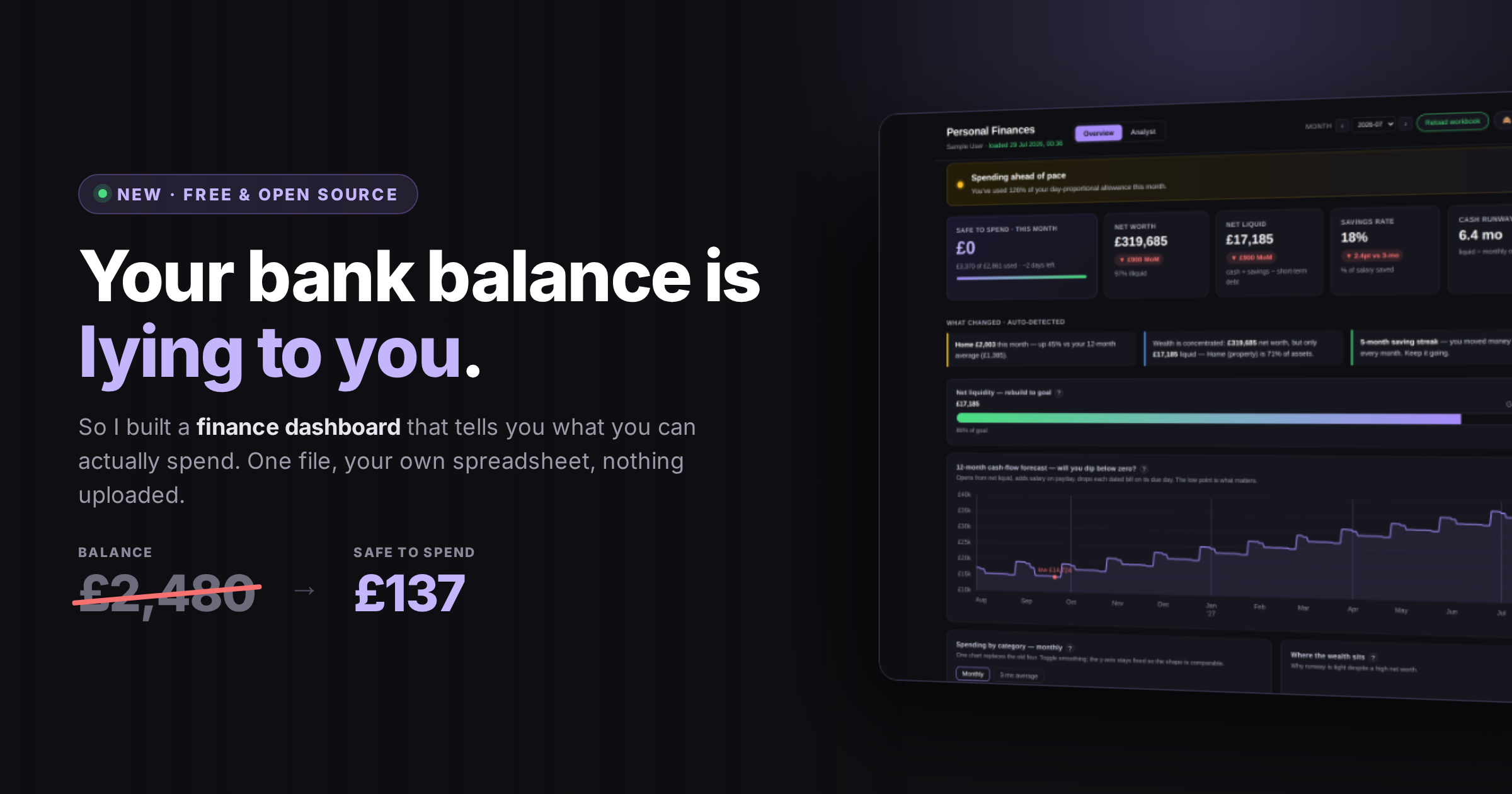
It says £800.
Rent goes out Friday. The card bill lands on the 20th. There’s a car insurance renewal on the 25th that you’d genuinely forgotten about. So the honest number — what you can actually spend between now and payday, without something bouncing later — isn’t £800. It’s nowhere on the screen.
Most of us solve this by feel. You keep a rough buffer in your head, spend a bit cautiously in the last week, and find out whether you got it right when the money either does or doesn’t run out. That works, more or less, until a month comes along with a dentist in it.
You can’t control what you don’t measure. It’s a line usually aimed at factories and sales teams, and it’s worn thin from overuse. However, personal money is the one place almost nobody applies it, and the one place it’s most obviously true. We measure what’s easy to see: the balance, the salary, the rent. What actually leaves the account, when, and how much of it quietly repeats every single month stays a feeling. And a feeling can’t be checked against anything, so it drifts — usually in the direction that’s most comfortable to believe.
I got tired of doing that arithmetic in my head, so I built the thing that does it for me. It’s free, it’s open source, and today I’m releasing it.
No signup, nothing uploaded. A sample spreadsheet is included so you can click around before deciding whether you care.
The first version was wrong
The spreadsheet came first and it was fine. Bank transactions imported and categorised automatically, a balance sheet, a monthly rollup. The data was good. Reading it was the problem: answering “how am I doing?” meant cross-referencing four tabs and doing arithmetic in my head.
So I built a dashboard on top of it. And I built the wrong one — twice.
The early versions had somewhere north of thirty charts across two scrolling tabs. Spending by category. Spending by subcategory. Spending by month. Top merchants. Asset mix. Liquid versus illiquid. It was, in fairness, comprehensive. It was also completely useless, because comprehensive is not the same as decisive. I’d open it to admire it, scroll through the whole thing, and close it no better informed than when I started. Thirty charts is thirty invitations to interpret, and interpretation is exactly the work you want the tool to have done for you.
The rewrite started from a different premise: what are the two or three questions I open this thing to answer? Not “what could be visualised?” but “what am I actually asking?”
They turned out to be: Am I fine? How much can I spend this month without regretting it? And is anything drifting that I haven’t noticed?
Answering the question first
The dashboard now opens on a verdict — a sentence, in plain English, telling you whether you’re on track — and a safe-to-spend figure for the rest of the month.

The important one is on the left: safe to spend. It takes what you have, subtracts what’s already committed between now and payday, and divides what’s left by the days remaining. One number, and it’s the one that governs whether you order the takeaway.
The others are context, not the point. Net worth sits there because it’s easy to compute and people expect it — but note how little it tells you next to cash runway, which says how many months you’d last if the income stopped. A big number on the left of that row and a small one on the right is a very specific, very common kind of trouble.
Below that, the dashboard tells you what changed without being asked. It compares every spending category against its own twelve-month average and surfaces only the ones that moved enough to matter.

I find this the single most valuable panel, because it catches the thing you’d never go looking for. Nobody opens a finance app thinking “I wonder if my restaurant spending crept up 43% this month.” You just quietly spend the money.
Where it’s going, and whether you’ll run out
Two views do the heavy lifting on the forward-looking side.
The first is a daily cash-flow forecast, twelve months out. It opens from your
current liquid position, drops your salary in on payday, and takes each dated bill out on the day it actually leaves. The point isn’t the ending balance — it’s the low point, marked on the chart, because that’s the moment you’d bounce a payment.

The second only matters if you have money tied up somewhere — a pension, a property, a share of a business. It shows how much of what you “have” is unreachable this month. If that’s not your situation the panel is nearly empty, which is its own kind of useful: it means nothing is hiding from you.

And for the current month, budget pacing that accounts for how far through the month you are. Being 60% through your food budget means something very different on the 5th than on the 25th, so the bars compare against a day-proportional allowance rather than the whole month. Click a category and the underlying transactions drop down.

There’s a second view — Analyst — behind a single toggle, for when you want the detail rather than the verdict: savings-rate history, per-category small multiples, subcategory spend against its own trailing average, an itemised balance sheet.

Privacy wasn’t a feature, it was the architecture
I wasn’t willing to upload my finances to anyone, which ruled out essentially every product in this category. That constraint turned out to be clarifying rather than limiting.
The whole thing is one HTML file. You open it, it reads your spreadsheet in your own browser, and it holds the figures in memory until you close the tab. There is no server, no account, no database, no analytics. Not “we promise not to look” — there is structurally nothing to look at. The hosted version is the same single file served as a static page; you can equally download it and run it offline forever.
The corollary is a privacy mode. Press H and every figure blurs, chart axes vanish and tooltips switch off, while the shapes and category names stay perfectly readable.

Making it not about me
I built it so I could show someone how the tool works, or share a screen, without also showing them my bank balance. It has turned out to be the feature I use most often when talking about the thing.
The hard part of releasing this wasn’t the code. It was that the code knew far too much about me.
A couple of friends asked for a copy earlier this month, which forced the question: what would someone else have to change to use it? The honest answer was uncomfortable. My pension providers were string-matched in JavaScript. My bank names determined which bills counted as card repayments. My spending categories were hardcoded in four separate places. The pound sign appeared in thirty-six.
So all of it came out. Every value that was about me rather than about the problem now lives in a Config sheet in the spreadsheet itself — currency, locale, category colours and order, how investments group, when the dashboard should warn you. Change the currency symbol to a euro and the entire dashboard re-denominates, privacy-mode blurring included. Delete the sheet entirely and it derives sensible defaults from whatever your data looks like.
There is now exactly one version of this file. The one I use every month is byte-for-byte identical to the one you can download. That was the point: not a sanitised public edition trailing behind a private one, but a single thing that
happens to work for both of us.
What it is and isn’t
It’s a spreadsheet layout plus a dashboard that reads it. The layout has to match — it looks for particular sheets and columns — so a blank template is included with every header in place, and a fully-populated sample so you can see where you’re heading. Within that structure everything is yours: your categories, your accounts, your currency.
It is not a budgeting app, it won’t connect to your bank, and it has no opinion about whether you should have bought the thing. It reads what you tell it and shows you what’s there. It also won’t fix a month where the numbers simply don’t work — no tool does that. What it will do is tell you that’s the situation on the 3rd rather than the 27th.
If that sounds useful:
Source, template and documentation are on GitHub, CC BY 4.0.
Take it, fork it, make it yours. And give me feedback!!
Leave a Reply